
What is the difference between RAM and storage?
www.yzokul.com.tr
- Category AI Resources
- Format PDF
- Size 7.1 MB
- Added 01.11.2026
- Views 1
This beginner-friendly answer book explains the difference between RAM and storage for readers with no prior knowledge. It answers the question by describing RAM as the fast working memory used during processing and storage as the more permanent place where files are saved. Using a desk-and-cupboard comparison, it shows how files move from storage into memory when opened. It also clarifies that large storage capacity does not mean large working memory, following a simple step-by-step path from zero knowledge to a clear basic understanding.
Read the Book
If the PDF does not appear, open it in a new tab.
A Chapter from the Book
What is the difference between RAM and storage? www.yzokul.com.tr
What is the difference between RAM and storage? The short answer is that RAM is fast working memory used during processing, while storage keeps files more permanently. RAM holds information the computer needs quickly right now. Storage saves files for later, even when the computer is off. This book explains each part step by step. 1
A computer needs two separate kinds of memory for two different jobs. One kind is for things being used right now, and the other is for things being kept. RAM handles the first job: fast access during work. Storage handles the second job: saving files long-term. Keeping these jobs separate helps the computer run smoothly. 2
RAM holds the information the computer needs to reach quickly while it is working. It is the fast working memory used during processing. When you open a program or edit a photo, the active parts are loaded into RAM. This lets the computer respond quickly to your actions. RAM is temporary and clears when you turn off the computer. 3
Storage is the place where files are saved more permanently. Files stay there even when the computer is turned off. Documents, photos, and programs are kept in storage until you need them. Storage is like a safe place for all your data. It is larger and slower than RAM but keeps things long-term. 4
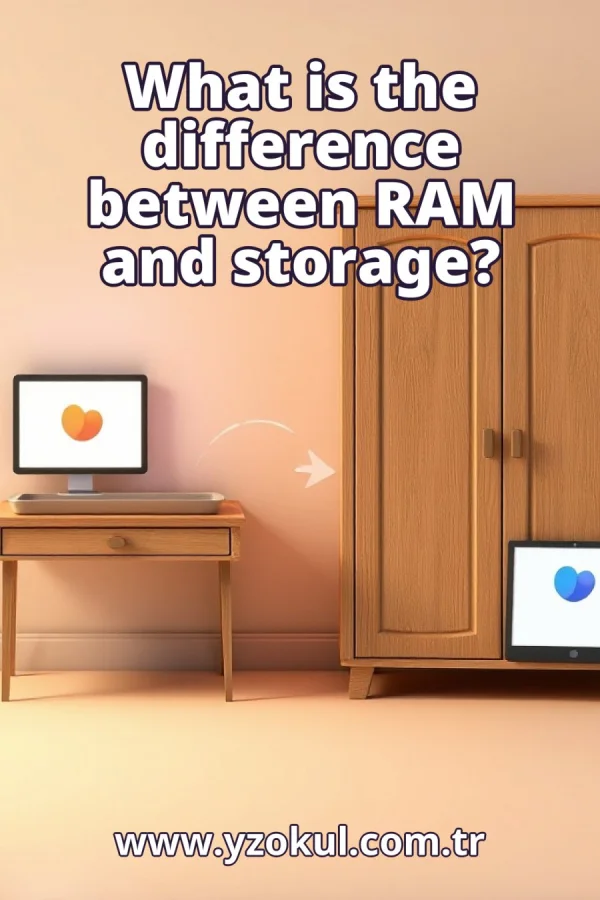
Think of a desk and a cupboard. What is being used at that moment is on the desk, and what is kept is in the cupboard. The desk is for active work, while the cupboard stores things for later. This picture helps you see the difference between RAM and storage. The desk is small and fast to use; the cupboard is big and holds more. 5
The desk stands for RAM. It holds only what is in active use right now. When you work on a task, you put the needed items on the desk. Similarly, RAM holds the data the computer is currently processing. It is fast but limited in space, so only the most needed items stay there. 6
The cupboard stands for storage. It holds the files that are kept for later. When you finish working, you put things back in the cupboard. Storage keeps your files safe even when the computer is off. It is larger than RAM but takes longer to reach into. This is where all your documents and programs live permanently. 7
When you open a file, the necessary parts are brought from storage into memory. The computer copies the data from storage into RAM so it can be used quickly. This is why opening a large file can take a moment. Once in RAM, the file is ready for you to work on without delays. 8
In the desk-and-cupboard picture, opening a file is like taking it out of the cupboard and placing it on the desk. You fetch only what you need for the current task. The rest stays in the cupboard. This keeps your desk uncluttered and your work fast. Similarly, the computer moves only the needed parts into RAM. 9
RAM is fast but limited, like a desk with only so much space. Only what is needed at the moment fits there. If you try to put too much on the desk, it becomes messy and hard to use. Similarly, if RAM is full, the computer slows down. That is why RAM is kept for active tasks only. 10
Storage is large and keeps things long-term, but reaching into it is not as quick as using the desk. That is why files are copied into RAM to be worked on. The cupboard can hold many things, but fetching them takes time. Storage works the same way: big capacity but slower access. So the computer moves data to RAM for speed. 11
Large storage capacity does not automatically mean large working memory. The two are measured and used separately. A computer can have a huge storage drive but very little RAM. This means it can keep many files but may struggle to work on several at once. Always check both numbers to understand performance. 12
A common mistake is thinking a big storage number means a fast, roomy working memory. For example, a laptop with a 1 TB storage drive might have only 8 GB of RAM. The big number tells you how many files you can keep, not how smoothly programs run. RAM and storage are different, so don't confuse them. 13
Another common mistake is treating RAM and storage as the same thing. The desk-and-cupboard picture shows why they are separate. RAM is for active use, storage is for keeping. If you mix them up, you might expect a computer to be fast just because it has a lot of storage. Remember: they serve different purposes. 14
When you read about a device, look at RAM and storage as two separate numbers. Each tells about a different job. The storage number tells you how much you can save. The RAM number tells you how much you can do at once. Both matter, but for different reasons. Check both to get a full picture. 15
RAM is the fast working memory used during processing, storage keeps files more permanently, and a big storage number does not mean a big working memory. Use the deskand-cupboard picture to remember: desk is RAM, cupboard is storage. When you open a file, it moves from cupboard to desk. Keep these ideas in mind to understand your computer better.
This section is a preview taken from the book (about 930 words). To continue, read the book or download the PDF.
Book Details
- Book
- What is the difference between RAM and storage?
- Author
- www.yzokul.com.tr
- Category
- AI Resources
- Language
- English
- Format
- PDF · 7.1 MB
- Pages
- 18
- Words
- about 931
- Published
- kaynak.yzokul.com.tr · 01.11.2026
- Access
- Free to read and download; for personal use only, all rights belong to the author.
Frequently Asked Questions
Is the PDF of What is the difference between RAM and storage? free?
Yes. What is the difference between RAM and storage? can be read and downloaded for free on this site; no sign-up or payment is required.
How many pages is What is the difference between RAM and storage??
What is the difference between RAM and storage? has 18 pages and about 931 words.
Which devices can I read What is the difference between RAM and storage? on?
It is a PDF; you can read it in your browser on a phone, tablet or computer, or download it and open it offline.
Who is the author of What is the difference between RAM and storage??
What is the difference between RAM and storage? was written by www.yzokul.com.tr; it is listed in the AI Resources category.
Similar Books
 What is artificial intelligence?
www.yzokul.com.tr
What is artificial intelligence?
www.yzokul.com.tr
 How does an app idea turn into a working program?
www.yzokul.com.tr
How does an app idea turn into a working program?
www.yzokul.com.tr
 How does a three-dimensional printer produce a model?
www.yzokul.com.tr
How does a three-dimensional printer produce a model?
www.yzokul.com.tr
 What is simulation?
www.yzokul.com.tr
What is simulation?
www.yzokul.com.tr
 What is the difference between a microcontroller and a normal computer?
www.yzokul.com.tr
What is the difference between a microcontroller and a normal computer?
www.yzokul.com.tr
 What is a microcontroller?
www.yzokul.com.tr
What is a microcontroller?
www.yzokul.com.tr