
What is the difference between an SSD and a hard disk?
www.yzokul.com.tr
- Category AI Resources
- Format PDF
- Size 7.4 MB
- Added 01.11.2026
- Views 1
This book answers the beginner question of how an SSD differs from a hard disk. It follows a simple path: first it explains that a hard disk stores data on rotating magnetic surfaces with mechanical parts, while an SSD keeps data in electronic memory cells. From there it shows why SSDs usually have lower latency, especially for random access, and notes that capacity, durability, and price vary by product. It closes by clarifying that both store files permanently and do not replace RAM.
Read the Book
If the PDF does not appear, open it in a new tab.
A Chapter from the Book
What is the difference between an SSD and a hard disk? www.yzokul.com.tr
You may have seen two kinds of storage devices: a hard disk and an SSD. The question is simple: how do they differ? The short answer is that a hard disk uses spinning magnetic surfaces, while an SSD uses electronic memory cells. That single difference explains most of what follows. 1
A hard disk and an SSD are both storage devices. Their job is to keep your files safely when the power is off, so you can open them again later. They are not the same as memory (RAM), which only holds what the computer is working on right now. Storage is for the long term; memory is for the moment. 2
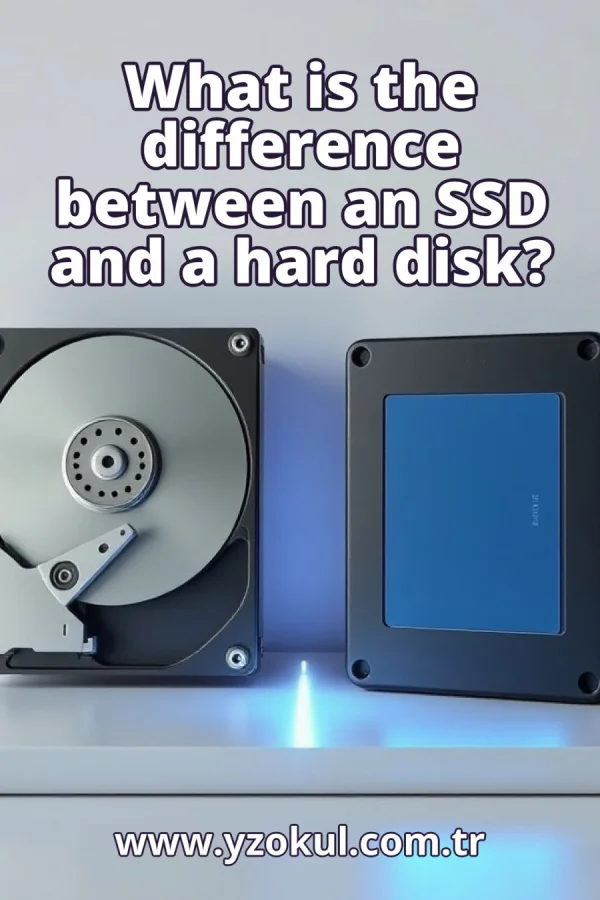
A hard disk, often called a hard drive, holds data on rotating magnetic platters. A platter is a round, flat disk coated with a magnetic material. The disk spins at high speed, and a small read/write head moves over the surface to read or write data. Because the platters spin and the head moves, a hard disk is a mechanical device with moving parts. 3
Inside a hard disk, the platters spin continuously while the device is on. A read/write head floats just above the surface and moves back and forth to find the right spot. To read a file, the head must physically travel to the correct location on the spinning platter. This mechanical movement takes time, which affects how fast data can be reached. 4
An SSD, short for solid-state drive, keeps data in electronic memory cells. There are no spinning disks and no moving read head. Instead, data is stored as electrical charges in tiny cells. Because access is electronic, the SSD can find data without any physical movement. This makes the SSD a purely electronic storage device. 5
In an SSD, there are no mechanical parts to move. Data is reached by electronic addressing: the drive's controller selects the right memory cells directly. This is similar to how a computer addresses RAM, though SSDs keep data even without power. Without spinning platters or a moving head, there is nothing mechanical to slow down access. 6
Latency is the delay before data can be read or written. In a hard disk, the head must move to the right track and wait for the platter to spin to the right position. That takes milliseconds. In an SSD, electronic addressing is almost immediate, so latency is much lower. This is why SSDs usually feel faster, especially for small, scattered files. 7
Random access means jumping between files stored in different places, rather than reading one long file in order. A hard disk must physically move its head for each jump, which adds delay. An SSD has no head to move, so it handles random access especially well. This is why an SSD often speeds up starting programs and opening many small files. 8
Both SSDs and hard disks come in many capacities, from small to very large. The capacity you get depends on the specific product you buy, not on the type alone. Some hard disks hold more data than some SSDs, and some SSDs hold more than some hard disks. Always check the listed capacity of the exact model. 9
Durability also varies by product. Some SSDs are built to withstand shocks because they have no moving parts, but not all SSDs are equally tough. Hard disks, with their moving parts, can be more sensitive to bumps, but well-made models are reliable. No blanket claim is true: check the specifications and reviews for the specific device. 10
Price depends on the product and its capacity, not just on the type. It is not a fixed rule that one type is always cheaper. A high-capacity SSD may cost more than a low-capacity hard disk, and a large hard disk may cost more than a small SSD. Compare prices for the capacity and features you need. 11
Both an SSD and a hard disk store files permanently. They keep your documents, photos, and programs safe when the computer is off. They do not directly replace RAM, which is working memory. RAM holds what the computer is doing right now and is cleared when power is lost. Storage and memory serve different purposes. 12
A common mistake is thinking an SSD is the same as RAM. An SSD keeps files permanently, like a filing cabinet. RAM holds the programs and data the computer is actively using, like a desk. An SSD does not replace RAM; it replaces the hard disk as a place to store files. Adding an SSD does not give you more working memory. 13
Another mistake is assuming every SSD is faster than every hard disk in every way. The usual difference is lower latency, especially for random access. But other features, such as maximum sequential speed or endurance, vary by product. A high-end hard disk can be fast for large files, while a cheap SSD may be slower in some tasks. Compare actual specifications. 14
Do not assume one type is always bigger or cheaper. Capacity and price must be checked per product. Some SSDs offer very large capacities, and some hard disks are small and cheap. The right choice depends on your needs and budget. Look at the exact model's capacity, price, and performance ratings before deciding. 15
To sum up: a hard disk uses spinning magnetic surfaces and moving parts, while an SSD uses electronic memory cells. Because of this, SSDs usually have lower latency, especially for random access. Both store files permanently and do not replace RAM. Capacity, durability, and price vary by product, so check the specific device you are considering.
This section is a preview taken from the book (about 952 words). To continue, read the book or download the PDF.
Book Details
- Book
- What is the difference between an SSD and a hard disk?
- Author
- www.yzokul.com.tr
- Category
- AI Resources
- Language
- English
- Format
- PDF · 7.4 MB
- Pages
- 18
- Words
- about 953
- Published
- kaynak.yzokul.com.tr · 01.11.2026
- Access
- Free to read and download; for personal use only, all rights belong to the author.
Frequently Asked Questions
Is the PDF of What is the difference between an SSD and a hard disk? free?
Yes. What is the difference between an SSD and a hard disk? can be read and downloaded for free on this site; no sign-up or payment is required.
How many pages is What is the difference between an SSD and a hard disk??
What is the difference between an SSD and a hard disk? has 18 pages and about 953 words.
Which devices can I read What is the difference between an SSD and a hard disk? on?
It is a PDF; you can read it in your browser on a phone, tablet or computer, or download it and open it offline.
Who is the author of What is the difference between an SSD and a hard disk??
What is the difference between an SSD and a hard disk? was written by www.yzokul.com.tr; it is listed in the AI Resources category.
Similar Books
 What is artificial intelligence?
www.yzokul.com.tr
What is artificial intelligence?
www.yzokul.com.tr
 How does an app idea turn into a working program?
www.yzokul.com.tr
How does an app idea turn into a working program?
www.yzokul.com.tr
 How does a three-dimensional printer produce a model?
www.yzokul.com.tr
How does a three-dimensional printer produce a model?
www.yzokul.com.tr
 What is simulation?
www.yzokul.com.tr
What is simulation?
www.yzokul.com.tr
 What is the difference between a microcontroller and a normal computer?
www.yzokul.com.tr
What is the difference between a microcontroller and a normal computer?
www.yzokul.com.tr
 What is a microcontroller?
www.yzokul.com.tr
What is a microcontroller?
www.yzokul.com.tr