
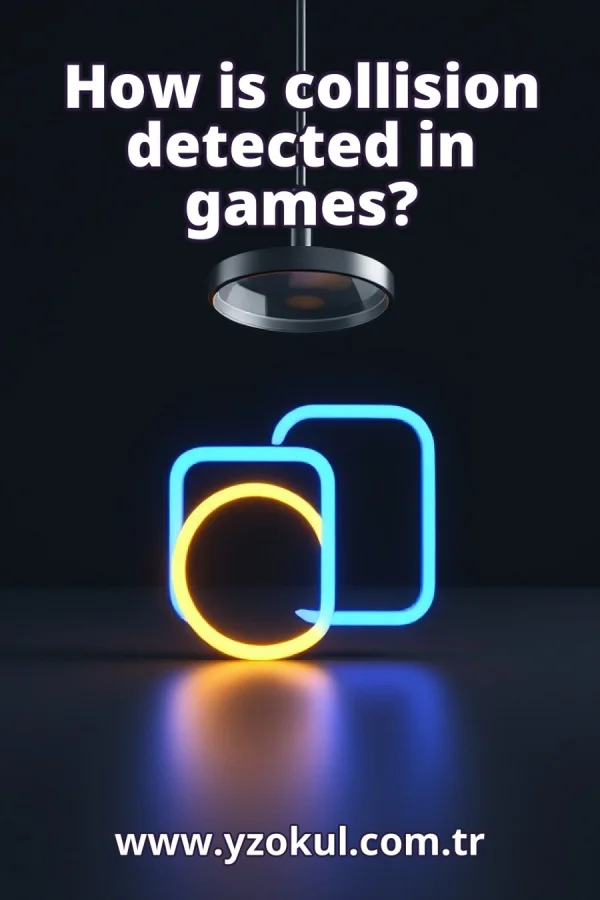
How is collision detected in games?
www.yzokul.com.tr
- Category AI Resources
- Format PDF
- Size 4.8 MB
- Added 01.11.2026
- Views 2
This book answers the question of how games detect when two objects touch or overlap. It follows a beginner-friendly path, starting from zero knowledge. It explains that games compare the positions and boundaries of objects, and that simple games often check whether rectangles or circles intersect. For example, when a character's boundary overlaps a wall's boundary, a collision is detected. More detailed games can use complex shapes. The book also makes clear that detecting a collision and calculating how objects react afterward are separate stages.
Read the Book
If the PDF does not appear, open it in a new tab.
A Chapter from the Book
How is collision detected in games? www.yzokul.com.tr
A game needs to know when two things touch, such as a character and a wall. The short answer is that the game compares where objects are and where their edges are. It checks if the edges overlap. If they do, the game decides a collision happened. This comparison happens many times per second. 1
Every object in a game, like a character, a wall, or a ball, has a position stored as a pair of numbers. These numbers tell the game where the object is on the screen. For example, a character might be at position (100, 50), meaning 100 pixels from the left and 50 pixels from the top. The game updates these numbers as objects move. 2
Each object also has a boundary, which is a shape that marks its outer edge. The boundary is often simpler than the object's actual picture. The game uses these boundaries to decide if two objects overlap. For example, a character might have a rectangular boundary around it. The boundary helps the game check collisions quickly. 3
Collision detection means comparing the boundary of one object with the boundary of another. If the two boundaries overlap, the game says a collision happened. This comparison is done using the position and size of each boundary. For example, the game checks if the character's boundary overlaps the wall's boundary. If yes, a collision is detected. 4
The simplest boundary shape is a rectangle. Many simple games wrap each object in a rectangle and check whether two rectangles overlap. A rectangle is defined by its position and its width and height. For example, a character might be a rectangle of width 30 and height 50. The game then checks if this rectangle overlaps with a wall's rectangle. 5
To check if two rectangles overlap, the game compares their edges on the screen. It checks if the left edge of one rectangle is to the left of the other's right edge, and similarly for the top and bottom edges. If all these conditions are true, the rectangles share some area, and the game treats it as a collision. For example, if a character's rectangle and a wall's rectangle share any area, a collision is detected. 6
Circles are another easy boundary shape. The game checks whether two circles are close enough that their edges touch or cross. This is done by comparing the distance between their centers to the sum of their radii. If the distance is less than the sum, the circles overlap. For example, two balls in a game might have circular boundaries, and a collision is detected when they get too close. 7
Consider a character moving toward a wall. The character has a rectangular boundary, and the wall has a rectangular boundary. As the character moves, the game checks if the character's boundary overlaps the wall's boundary. When they overlap, the game detects a collision. For example, if the character's rectangle touches the wall's rectangle, the game knows the character hit the wall. 8
A rectangle or circle around an object may not match its exact outline. For example, a character with a complex shape might be approximated by a rectangle that includes some empty space. That is fine for simple games, because it is fast and good enough. The game can still detect collisions reliably without perfect accuracy. 9
More detailed games can use complex shapes as boundaries instead of simple rectangles or circles. These shapes might be polygons that follow the object's outline more closely. This gives a closer match to the real outline of an object. For example, a racing game might use a polygon boundary for a car to detect precise collisions with track walls. 10
Finding a collision is only the first stage. The game first answers the question: did the boundaries overlap? This stage is called collision detection. It only checks for overlap and does not decide what happens next. For example, the game might detect that a character's boundary overlaps a wall's boundary. 11
Deciding how objects react after a collision is a different stage. After detecting a collision, the game might make the character stop, bounce back, or lose health. This stage is called collision response. Detecting the touch and calculating the response are kept separate. For example, after detecting a collision with a wall, the game might move the character back to the previous position. 12
A common mistake is thinking detection and reaction are the same thing. They are two separate steps, and the game handles them one after the other. First, the game detects the collision by comparing boundaries. Then, it calculates the reaction. For example, the game might first detect that a character hit a wall, and then stop the character's movement. 13
Another mistake is assuming the game always checks the exact outline of every object. Simple games often use rough boundaries like rectangles or circles instead. These are faster to compute and good enough for many situations. For example, a simple platformer might use rectangles for all objects, even if their pictures are more detailed. 14
A rough boundary can report a touch slightly early or late. For example, a rectangular boundary around a character might detect a collision before the character's visible edge actually touches a wall. That is a known trade-off, not a bug, in simple collision detection. It keeps the game fast and simple.
This section is a preview taken from the book (about 907 words). To continue, read the book or download the PDF.
Book Details
- Book
- How is collision detected in games?
- Author
- www.yzokul.com.tr
- Category
- AI Resources
- Language
- English
- Format
- PDF · 4.8 MB
- Pages
- 18
- Words
- about 962
- Published
- kaynak.yzokul.com.tr · 01.11.2026
- Access
- Free to read and download; for personal use only, all rights belong to the author.
Frequently Asked Questions
Is the PDF of How is collision detected in games? free?
Yes. How is collision detected in games? can be read and downloaded for free on this site; no sign-up or payment is required.
How many pages is How is collision detected in games??
How is collision detected in games? has 18 pages and about 962 words.
Which devices can I read How is collision detected in games? on?
It is a PDF; you can read it in your browser on a phone, tablet or computer, or download it and open it offline.
Who is the author of How is collision detected in games??
How is collision detected in games? was written by www.yzokul.com.tr; it is listed in the AI Resources category.
Similar Books
 What is artificial intelligence?
www.yzokul.com.tr
What is artificial intelligence?
www.yzokul.com.tr
 How does an app idea turn into a working program?
www.yzokul.com.tr
How does an app idea turn into a working program?
www.yzokul.com.tr
 What is the difference between virtual reality and augmented reality?
www.yzokul.com.tr
What is the difference between virtual reality and augmented reality?
www.yzokul.com.tr
 How does a three-dimensional printer produce a model?
www.yzokul.com.tr
How does a three-dimensional printer produce a model?
www.yzokul.com.tr
 What is simulation?
www.yzokul.com.tr
What is simulation?
www.yzokul.com.tr
 How does a robot find the shortest path?
www.yzokul.com.tr
How does a robot find the shortest path?
www.yzokul.com.tr